Thursday, 24 September 2015
Term 3 Reflection
During term 3 I have been working on integrating a lot of what I had been working on with iPads into the netbook world. The key thing that I have continued with when creating greater scaffolded reading followup activities have been the use of audio instructions and queues.
One interesting thing that I have found out when creating audio instructions and queues is the more natural they are the more powerful they are to the students. When I had created more of a scripted instruction I found that the students weren't getting the most out of it. I realised that the true power of these instructions was when I was recreating myself - more natural and conversational. This way it is like I am answering a question that the student has asked rather than just telling them what to do.

Wednesday, 5 August 2015
Creating Scaffolds That Enable Higher Order Thinking
During the last 4 weeks of term 2 and the beginning of this term my main focus of my inquiry has been on scaffolds. I have re-realised just how important they are to my teaching and the student's learning.
The main catalyst for changing how I use scaffolds has been the shift from teaching extension students to teaching well below students. I was suddenly thrust into a world where every student needed instructions explained, re-explained and even re-re-explained! They needed way more help when they worked independently than I had realised!
So, this has led me to create templates (see below) with loads of instructions. I have also needed to create audio voice recordings to explain these instructions further for those who are reading well below. This has lead me to chunk each piece of the create cycle into smaller, more manageable pieces with clear modelling on how to achieve these.
What difference have these practice changes made? Well, for once I feel like I am starting to get content that is more thought out, in-depth and shows me where the students are at in their thinking or understanding of the content. This is the first time that I have been able to strike a balance between the creating of a quality product married with quality thoughts and insights.
Where to know? I am beginning to see this line of thought and practice seep into other learning areas. I am beginning to develop more scaffolds and aids in maths and am finding that the students acquisition of new concepts is quicker. I'm excited to see where this will lead.
The main catalyst for changing how I use scaffolds has been the shift from teaching extension students to teaching well below students. I was suddenly thrust into a world where every student needed instructions explained, re-explained and even re-re-explained! They needed way more help when they worked independently than I had realised!
So, this has led me to create templates (see below) with loads of instructions. I have also needed to create audio voice recordings to explain these instructions further for those who are reading well below. This has lead me to chunk each piece of the create cycle into smaller, more manageable pieces with clear modelling on how to achieve these.
 |  |
 | |
Where to know? I am beginning to see this line of thought and practice seep into other learning areas. I am beginning to develop more scaffolds and aids in maths and am finding that the students acquisition of new concepts is quicker. I'm excited to see where this will lead.
Thursday, 2 July 2015
Examples of Recent Explain Everything Projects
I have noticed that my recent Explain Everything project design has developed after working with Michelle George here at school. Her idea was to use our school wide progressions as a tool/ filter to base our projects on. For example, see the Red progression.

When using these I have been able to identify student's current and next learning steps. I have also been able to evaluate the quality of the learning that my students will undertake when completing my projects. In this way I have seen the learning and engagement increase.
Here are two examples of my Explain Everything projects (thanks to Emma Berry for the compare and contrast template!):
Tuesday, 30 June 2015
Term 2 Presentation/ Reflection
The direction of my inquiry this term has definitely been defined by the development of templates that provide quality scaffolding. I realised through professional conversations and reflections that I was under scaffolding... by quite some way! So I decided to up my game and provide better temples and scaffolds.
Below is my presentation to the staff that outlines these changes:
Below is my presentation to the staff that outlines these changes:
Monday, 29 June 2015
Creating Explain Everything Templates
While creating a number of Explain Everything projects every week, I have found that there are some activities/ pages that I repeat from week to week. I was starting to get annoyed with re-creating these over and over again. Then it struck me... screenshots!
So in EE and in my photo reel on my iPad I have created a template folder with my most used or recent activity pages. This has sped up the EE project creation hugely as all I have to do is import the photo, crop it and adjust for that book. Easy!
Here are a few examples:
So in EE and in my photo reel on my iPad I have created a template folder with my most used or recent activity pages. This has sped up the EE project creation hugely as all I have to do is import the photo, crop it and adjust for that book. Easy!
Here are a few examples:
 |  |  |
Wednesday, 27 May 2015
Creating Explain Everything Projects Using Audio Instructions
Since the beginning of the year I have been trying to get my target group using Explain Everything independently. This has had varying degrees of success! Recently, I have been trying to provide detailed written instructions on each slide to help the boys complete the activity. (see below) However, I was still finding that there was still a high degree of miscommunication and misunderstanding.


I had a brain wave! I had noticed that some of the junior teachers were inserting an audio file for spelling words. This got me thinking. I could do the same but instead record my instructions so that my boys new exactly what to do. (see below)
This has made a huge difference. Suddenly my instructions are rewindable, pauseable and much clearer. The boys aren't interrupting me anywhere near the same and I have noticed the quality of their work has improved also. I have also decided to keep my written instructions so that the boys are able to read along with the audio instructions.
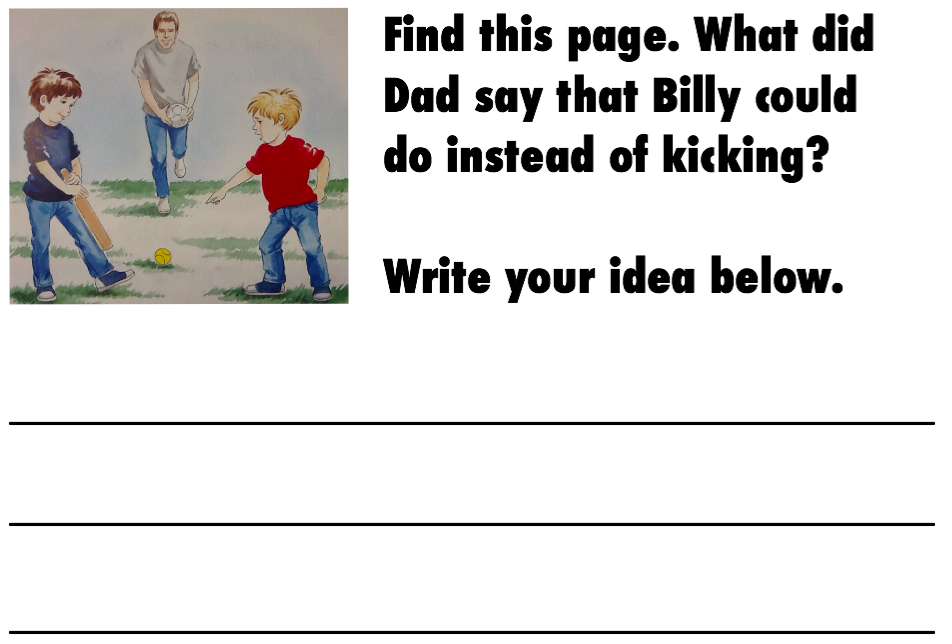

I had a brain wave! I had noticed that some of the junior teachers were inserting an audio file for spelling words. This got me thinking. I could do the same but instead record my instructions so that my boys new exactly what to do. (see below)
This has made a huge difference. Suddenly my instructions are rewindable, pauseable and much clearer. The boys aren't interrupting me anywhere near the same and I have noticed the quality of their work has improved also. I have also decided to keep my written instructions so that the boys are able to read along with the audio instructions.
Sunday, 12 April 2015
Reflection Presentation
This term has been a good start to reaching my long term goal. I have enjoyed finding solutions to problems with the students. For example, how my students access their work, how they share their explain everything projects, etc. I have been impressed with their increase of confidence and self management and really looking forward to how this might develop further throughout the year.
Where I want to head next is:
- How might I make connections from my use of explain everything with my students to the use of Movenote?
- How am I going to use SOLO in my project design?
- I want to explore the use of that Fast Forward series of books for my lower kids.
Subscribe to:
Posts (Atom)